eManual_cubeLMS

2025-06-22 Release Notes

IMPROVEMENTS

Release Date: 2025-06-22

[General] Online manual 자동 번역 기능 제공
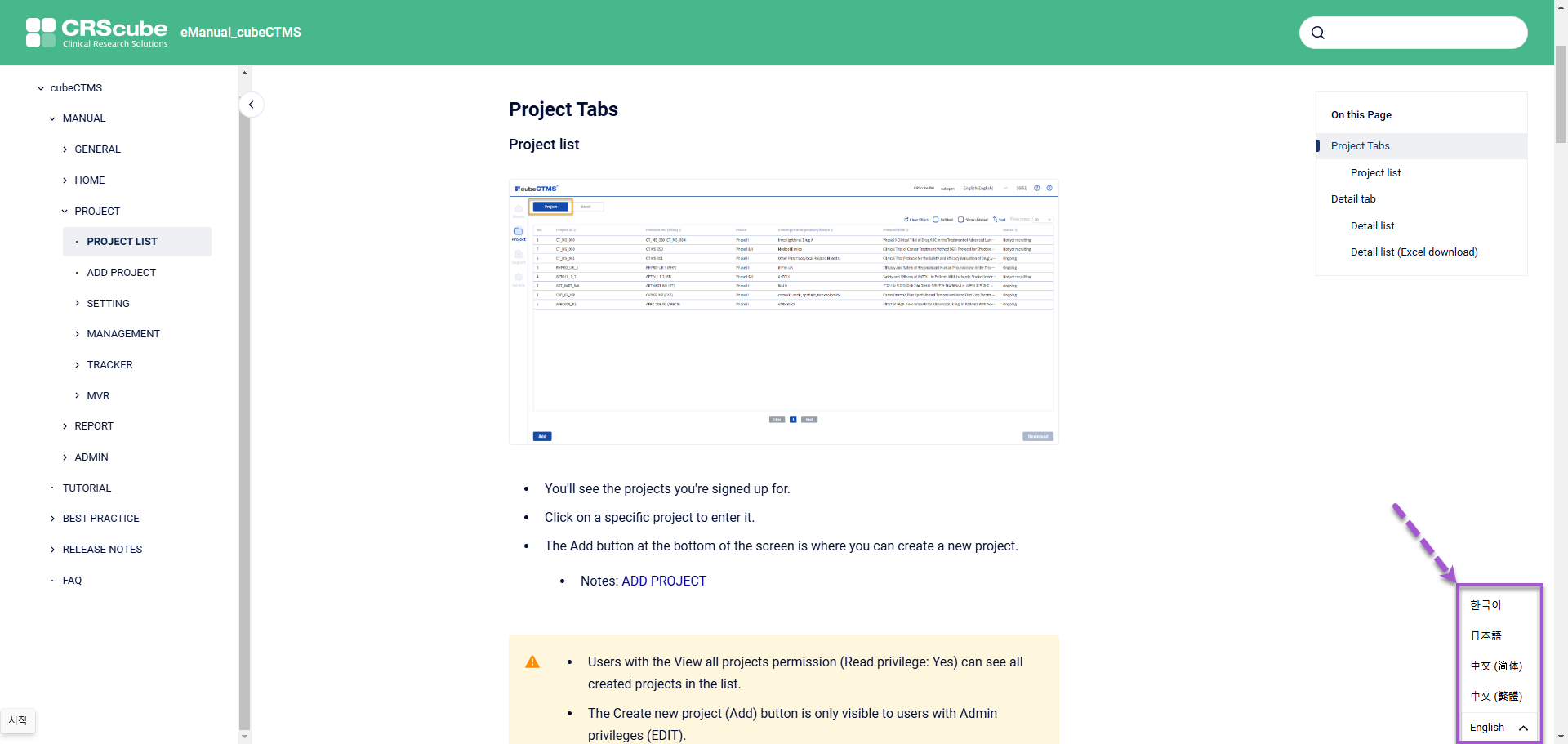
image-20250227-062228.png
  • Online manual 열람 시 신규 추가된 우측 하단 Language 선택 Widget을 통해 다른 국가의 언어로 번역된 내용을 확인하실 수 있습니다.

    • 제공 언어

      • English

      • Korean

      • Japanese

      • Traditional Chinese

      • Simplified Chinese

  • 최초 방문 시 제공되는 언어는 Online manual을 접속하신 브라우저에 설정된 기본 언어입니다.

    • 브라우저에 설정된 기본 언어가 위 언어 중에 존재하지 않는다면 기본 값으로 설정된 English로 보여집니다.

    • 최초 이후부터는 직전 방문 시점의 우하단 Widget에 선택된 언어가 초기 값입니다.


[Filter] My Training, User 메뉴의 일부 컬럼에 Filter 기능 추가

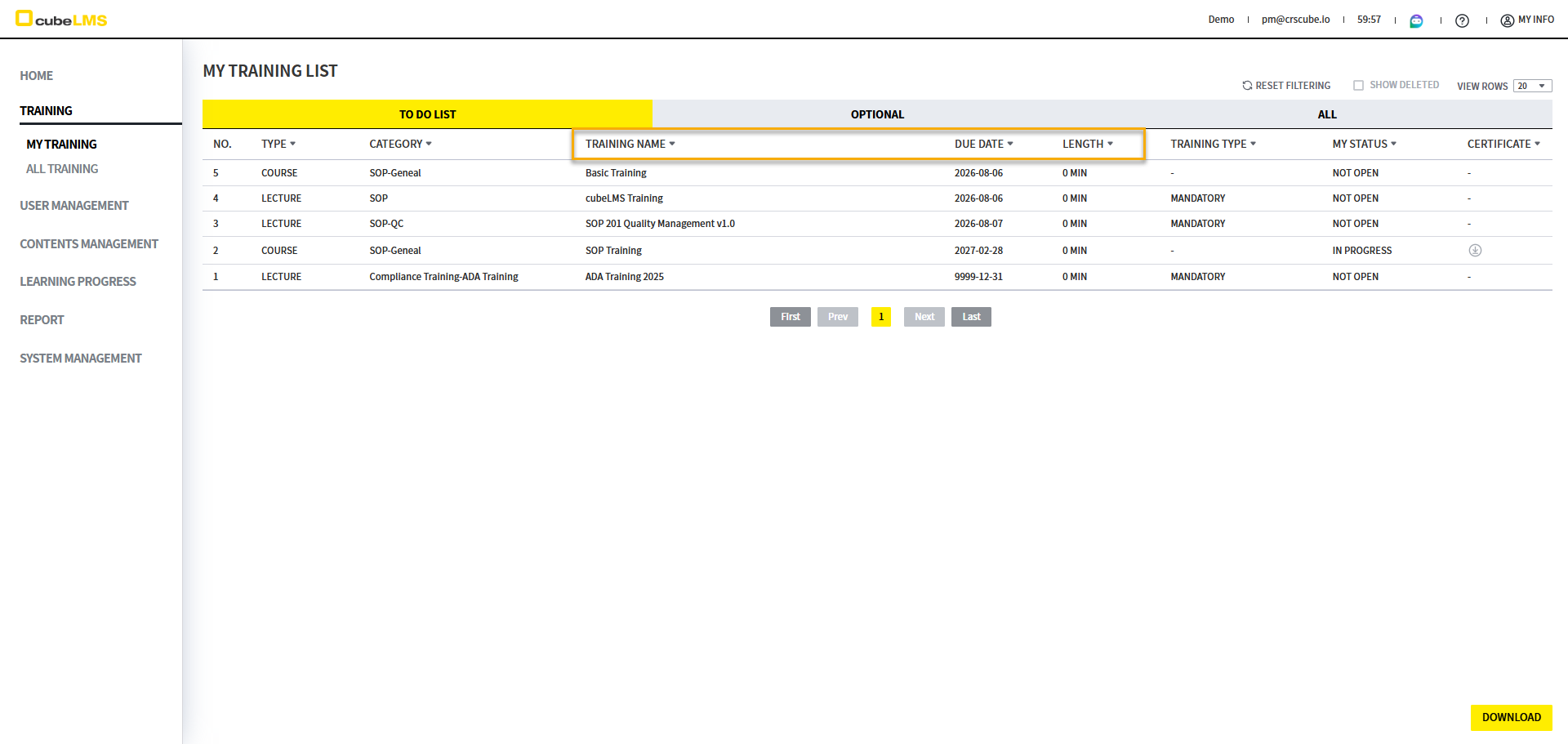
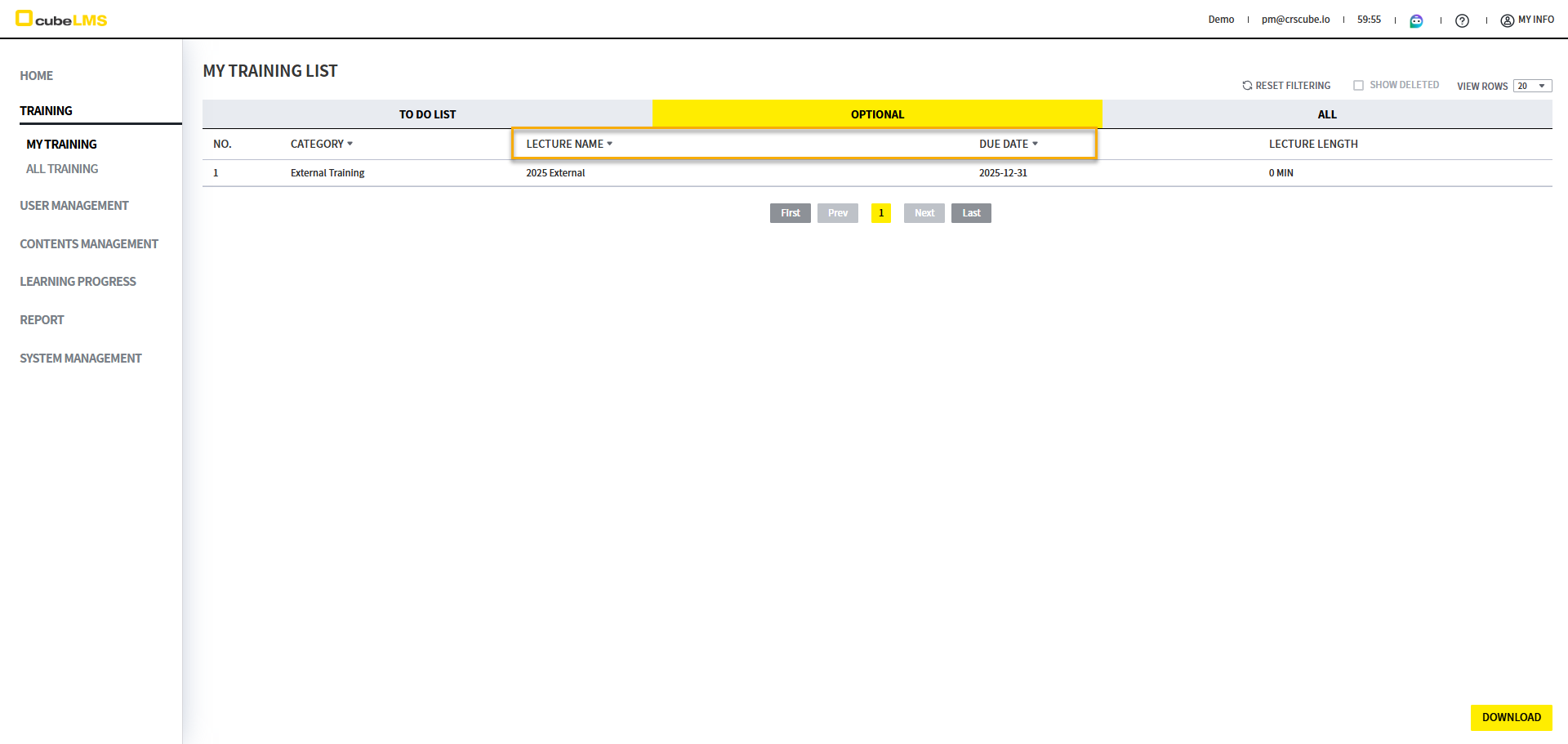
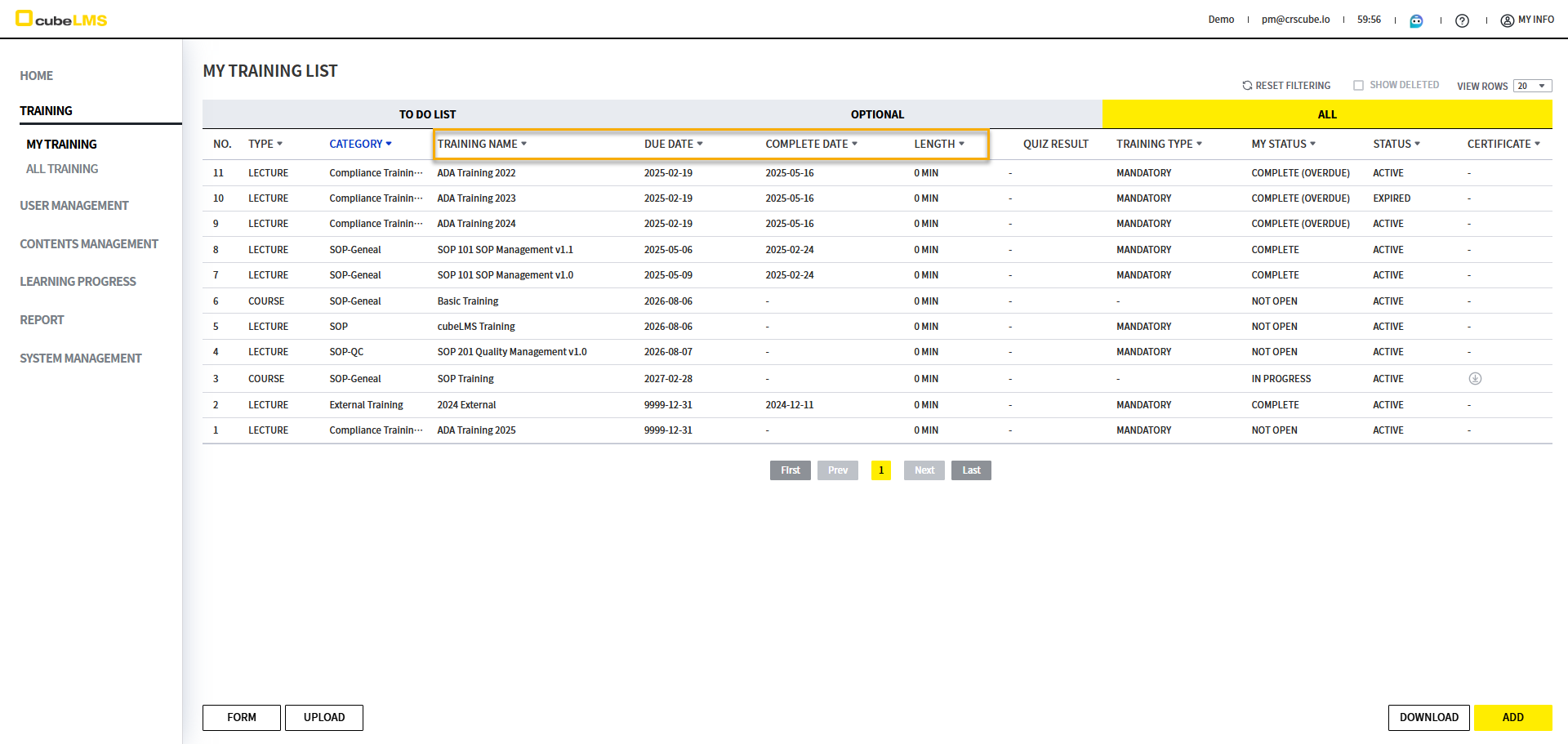
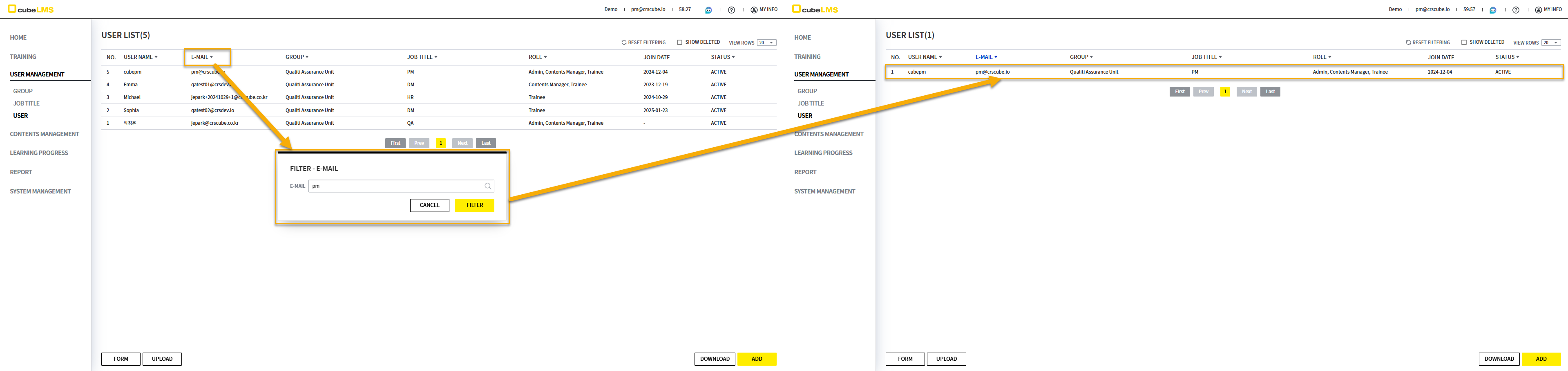
  • 아래 메뉴의 각 컬럼에 필터 기능이 추가됩니다. 메뉴별 필터가 추가되는 컬럼은 아래와 같습니다.

Training - My Training

To Do List

Optional

All

image-20250516-075446.png


image-20250516-072816.png


image-20250516-072848.png


Tab

Column

Filtering

Description

To Do List

Training Name

Text Input

해당 항목에 포함된 텍스트를 기준으로 필터링할 수 있습니다.

Due Date

Date Range

Training의 마감일 범위를 기준으로 필터링할 수 있습니다.

Length

Number Range

Training 길이를 필터링할 수 있습니다.

Optional

Training Name

Text Input

해당 항목에 포함된 텍스트를 기준으로 필터링할 수 있습니다.

Due Date

Date Range

Training의 마감일 범위를 기준으로 필터링할 수 있습니다.

All

Training Name

Text Input

해당 항목에 포함된 텍스트를 기준으로 필터링할 수 있습니다.

Due Date

Date Range

Training의 마감일 범위를 기준으로 필터링할 수 있습니다.

Complete Date

Date Range

Training의 완료일 범위를 기준으로 필터링할 수 있습니다.

Length

Number Range

Training 길이를 필터링할 수 있습니다.


User Management - User
image-20250516-073141.png

Column

Filtering

Description

Training Name

Text Input

본 항목을 Like로 Filtering 할 수 있습니다.


Number Rage Filter

cubeLMS에 처음으로 추가된 필터입니다. 상세 내용은 아래와 같습니다.
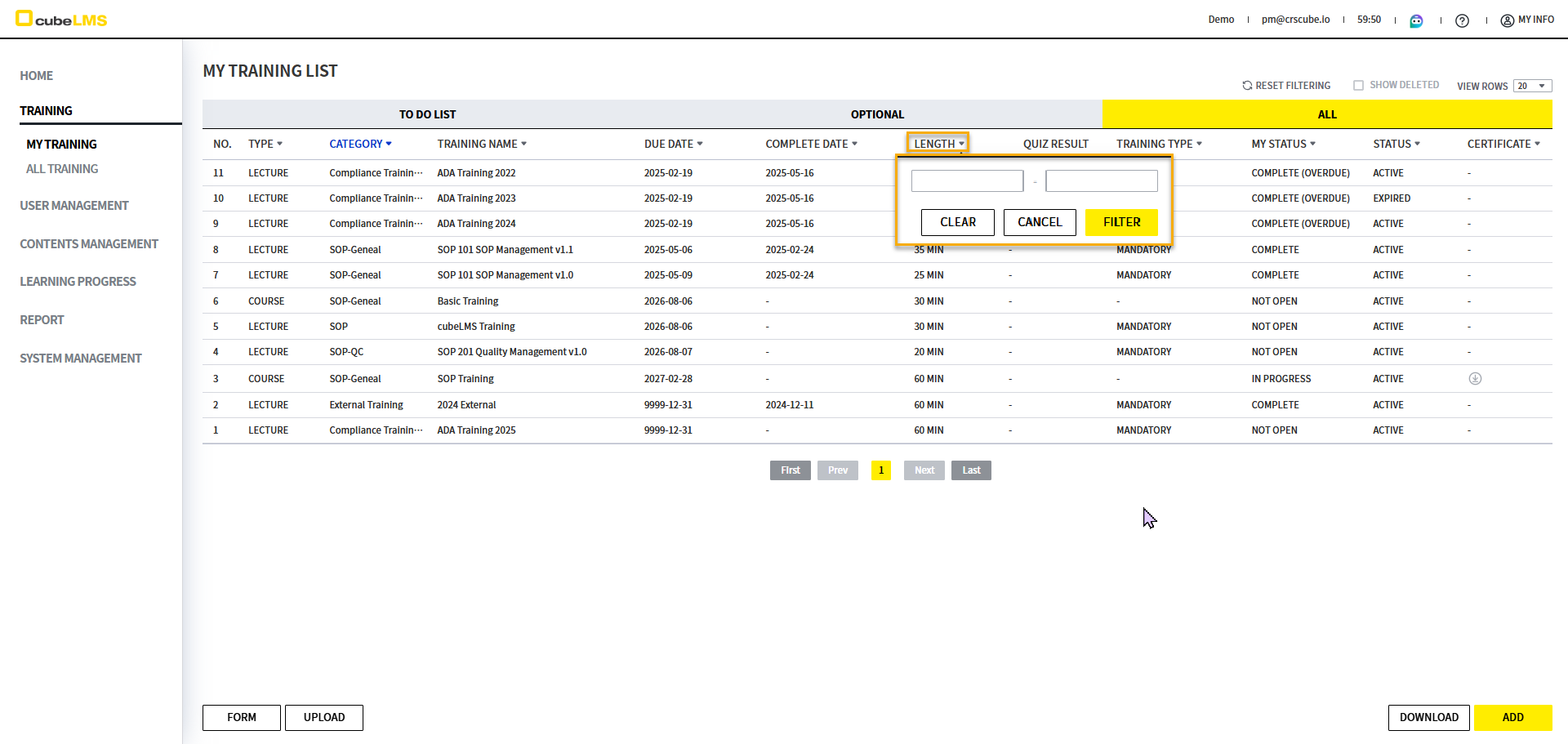
image-20250516-074915.png


  • 숫자만 입력 가능합니다.

image-20250516-075012.png


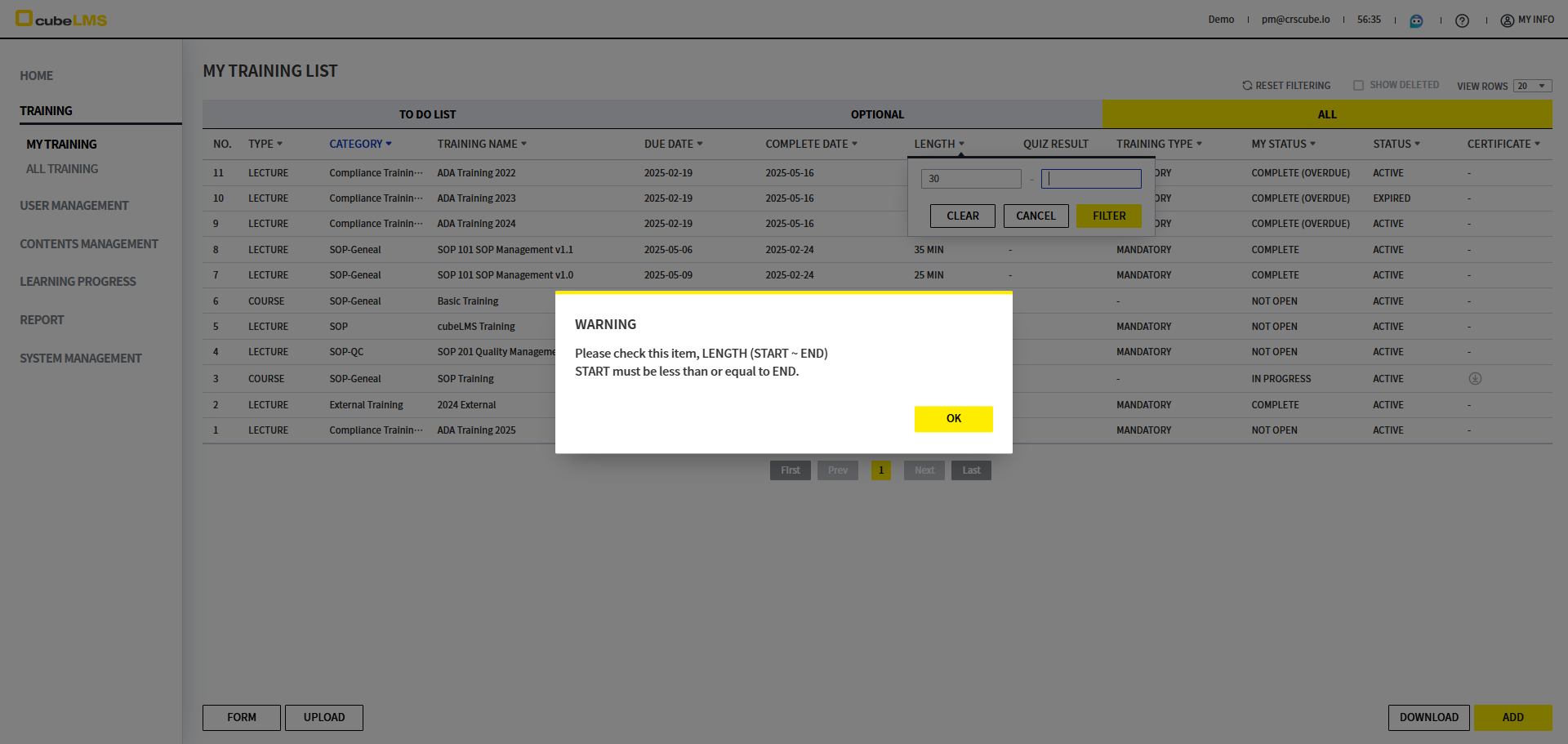
  • 시작 값을 마지막 값보다 크게 입력하거나, 마지막 값을 시작 값보다 작게 입력하여 필터할 경우 아래와 같은 팝업이 표시됩니다.

    • WARNING

    • Please check this item, LENGTH (START ~ END). START must be less than or equal to END.


[Learning Progress] User 메뉴의 Active Period 라벨 변경

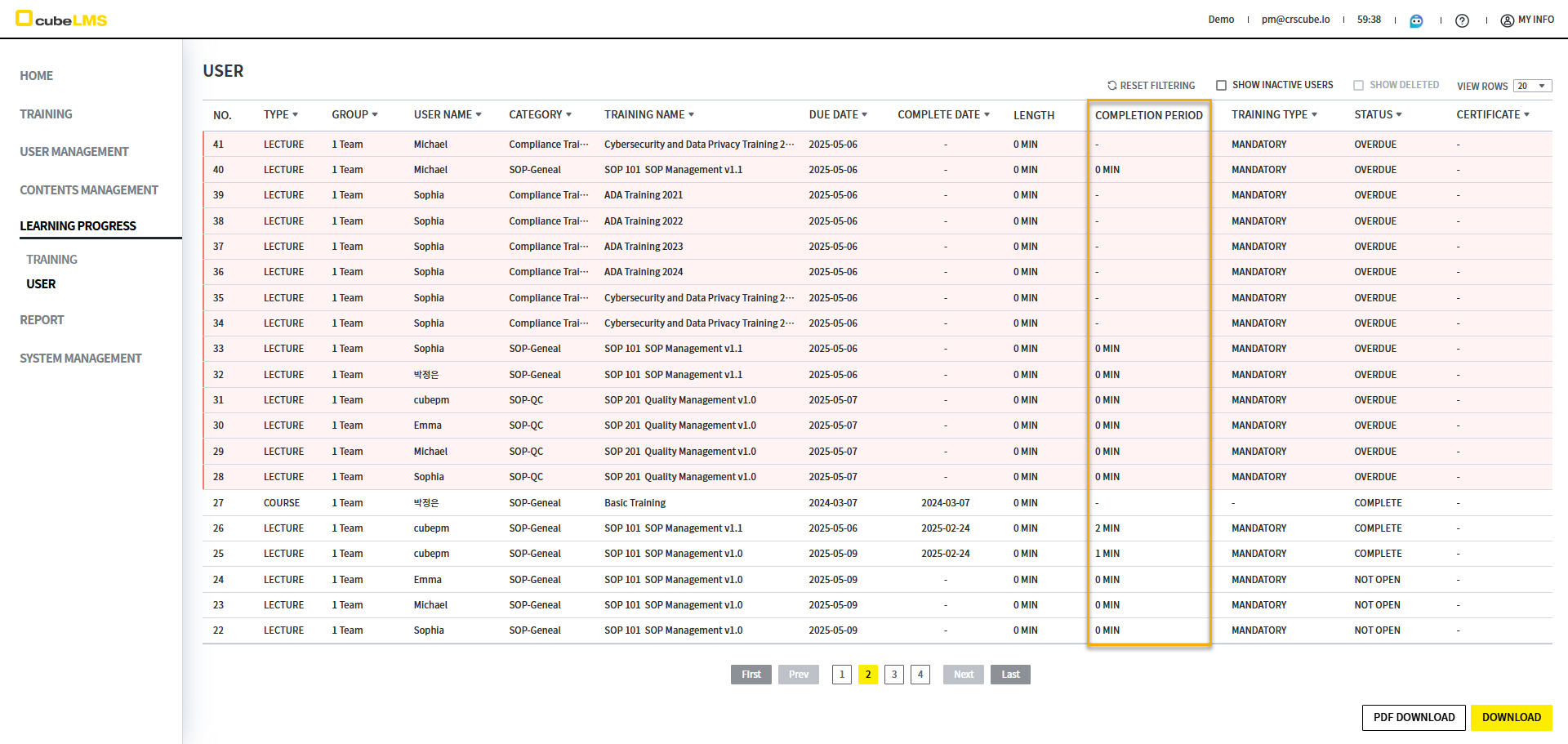
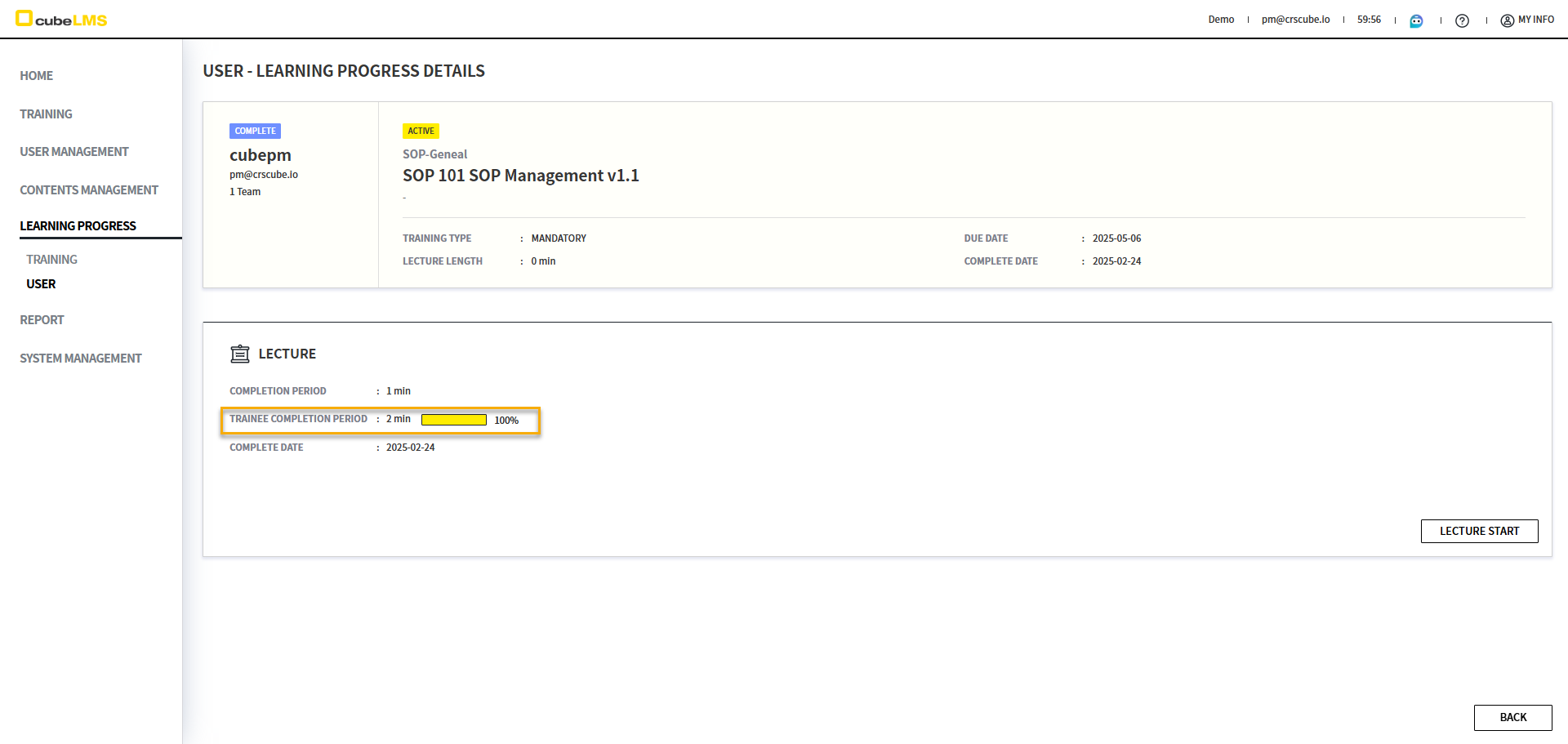
  • Learning Progress - User 메뉴 리스트에서 표시되는 특정 컬럼의 문구가 User에게 혼선을 줄 여지가 있어, 상세 화면과 동일하게 변경되었습니다.

    • 변경 전: Active Period

    • 변경 후: Completion Period

image-20250509-023449.png
image-20250509-023458.png


[Dashboard] Role별로 표시되는 Summary Information 개선

Role

Category

AS-IS

TO-BE

Admin

문구 변경

image-20241205-060517.png
  1. TRAINEE - OVERDUE
    The number of trainees that exceed due date of assigned Lecture.

  2. TRAINEE - COMPLETE(OVERDUE)
    The number of trainees who have been completed the assigned Lecture beyond the due date.

  3. Lecture PROGRESS
    The number of Lectures not completed.

  4. INVALID LectureS
    The number of Lectures in invalid status.

  1. Training - OVERDUE
    The number of assigned Training exceeded the due date.

  2. Training - COMPLETE(OVERDUE)
    The number of assigned Training completed after the due date.

  3. INCOMPLETE PROGRESS
    The number of "INCOMPLETE" Training at least one trainee has not completed.

  4. INVALID LectureS
    The number of "INVALID" Lectures.

Contents Manager

문구 변경

image-20241205-063636.png
  1. INVALID
    The number of Lectures in invalid status.

  2. ACTIVE
    The number of Lectures in "ACTIVE" status.

  3. INACTIVE
    The number of Lectures in "INACTIVE" status.

  4. TOTAL
    The number of total Lectures registered.

  1. NVALID
    The number of "INVALID" Lectures.

  2. ACTIVE
    The number of "ACTIVE" Lectures.

  3. INACTIVE
    The number of "INACTIVE" Lectures.

  4. TOTAL
    The number of total Lectures registered.

집계 변경

  • Active: Active 상태인 Lecture, Course의 수

  • Total: Lecture, Course의 총 합

  • Active: Active 상태인 Lecture 수

  • Total: 전체 Lecture 수

Trainee

문구 변경

image-20241205-063704.png
  1. OVERDUE
    The number of Lectures in "OVERDUE" status.

  2. NOT OPEN
    The number of Lectures in "NOT OPEN" status.

  3. IN PROGRESS
    The number of Lectures in "IN PROGRESS" status.

  4. COMPLETE
    The number of Lectures in "COMPLETE" AND "COMPLETE(OVERDUE) status".

  1. OVERDUE
    The number of "OVERDUE" vTraining.

  2. NOT OPEN
    The number of "NOT OPEN" Training.

  3. IN PROGRESS
    The number of "IN PROGRESS" Training.

  4. COMPLETE
    The number of "COMPLETE" or "COMPLETE(OVERDUE)" Training.

필터링 변경

  • COMPLETE 카드 선택: 아래 조건으로 Filter된 화면으로 이동

    • Status: Complete, Complete(Overdue)

  • COMPLETE 카드 선택: 아래 조건으로 Filter된 화면으로 이동

    • Status: Complete, Complete(Overdue)

    • Category: 이전 교육을 제외한 카테고리


[Group] Filter 팝업에서 Group이 개별로 체크되도록 개선

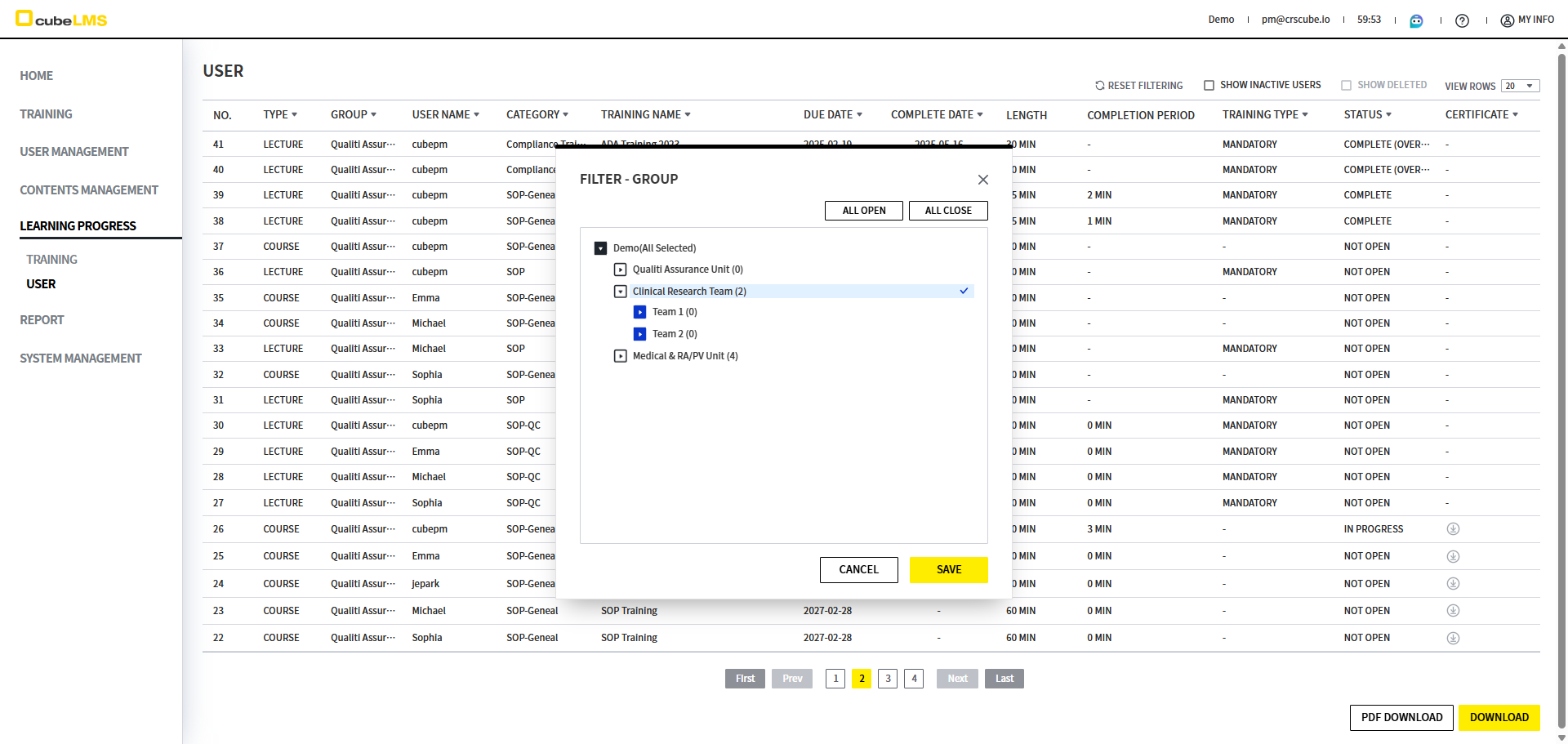
카테고리와 동일하게 계층 구조의 그룹 필터 팝업에서 각 그룹이 개별로 선택되도록 개선되었습니다.

  • 변경 전: 부모 그룹 선택 시 자식 그룹이 모두 선택됩니다.

  • 변경 후: 선택한 그룹만 선택됩니다.

image-20250519-050832.png


기타

Release Date: 2025-06-22

  • Lecture와 Course가 포함된 Category 삭제시 표시되는 문구가 변경되었습니다.

    • 전: Can not delete the category. There are not deleted Lectures in the category.

    • 후: Cannot delete the category. This category contains Training.

  • Learning Progress - User 메뉴의 Lecture Detail 화면에서 Quiz History를 Download 받을 경우 Learning_Progress_User_Quiz_History_List_yyyymmddhhmmss 형식으로 표시되도록 변경되었습니다.

  • Filter 팝업에서 Like 검색 후 전체 체크할 경우 Like 검색된 내용만 체크되도록 변경되었습니다.