eManual_cubeLMS

JPN_2025-06-22 Release Notes

IMPROVEMENTS

Release Date: 2025-06-22

[General] Online manual の自動翻訳機能を提供します
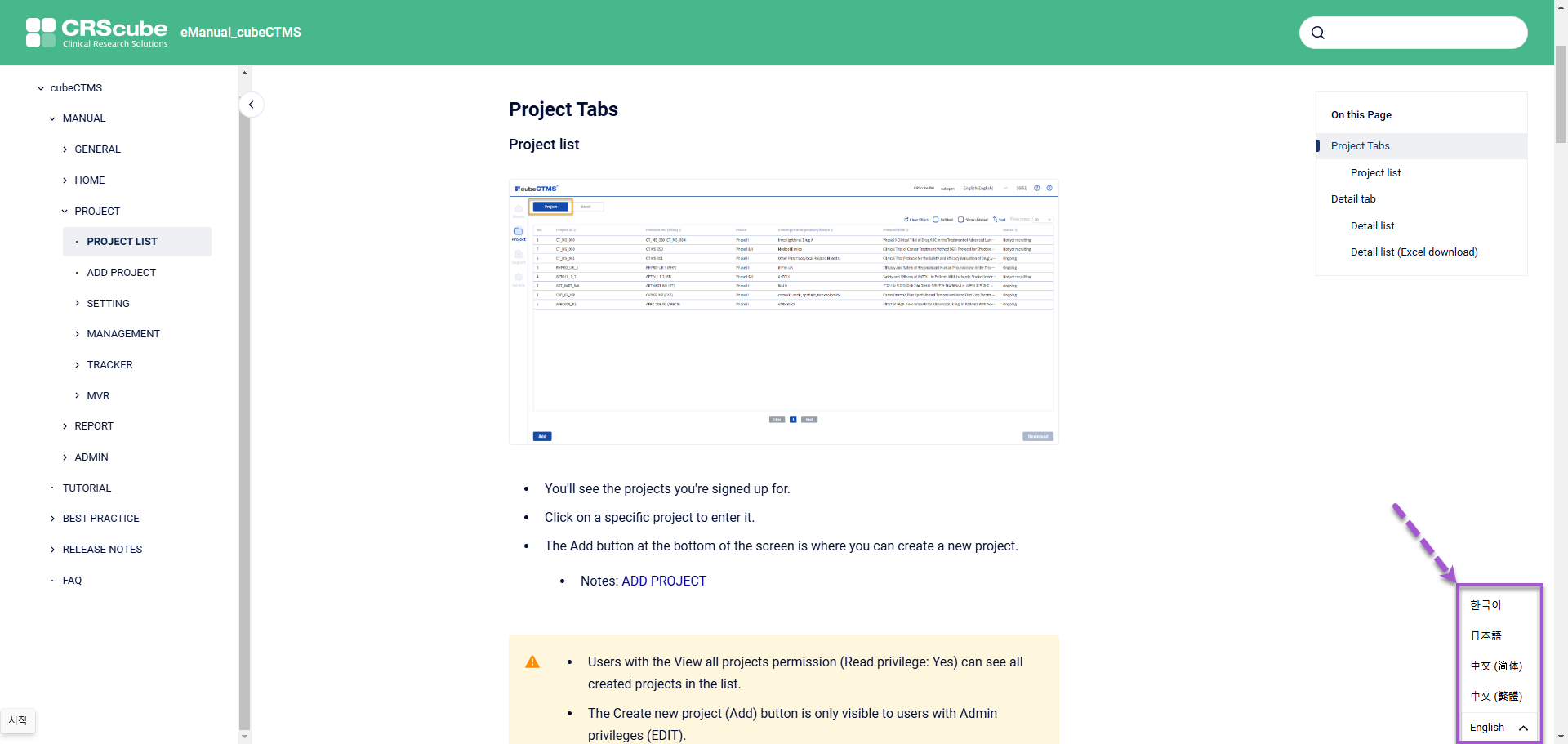
image-20250227-062228.png
  • Online manual を閲覧すると、新しく追加された右下の Language 選択 Widget で、他の国の言語に翻訳された内容を確認できます。

    • 提供言語

      • English

      • Korean

      • Japanese

      • Traditional Chinese

      • Simplified Chinese

  • 初回訪問時に提供される言語は、Online manual にアクセスしたブラウザに設定された既定の言語です。

    • ブラウザに設定された既定の言語が上記の言語に存在しない場合は、既定値として設定された English で表示されます。

    • 初回以降は、直前の訪問時点で右下の Widget で選択された言語が初期値になります。


[Filter] My Training, User メニューの一部の列に Filter 機能を追加

  • 下記メニューの各列にフィルタ機能が追加されます。メニューごとにフィルタが追加される列は以下のとおりです。

Training - My Training

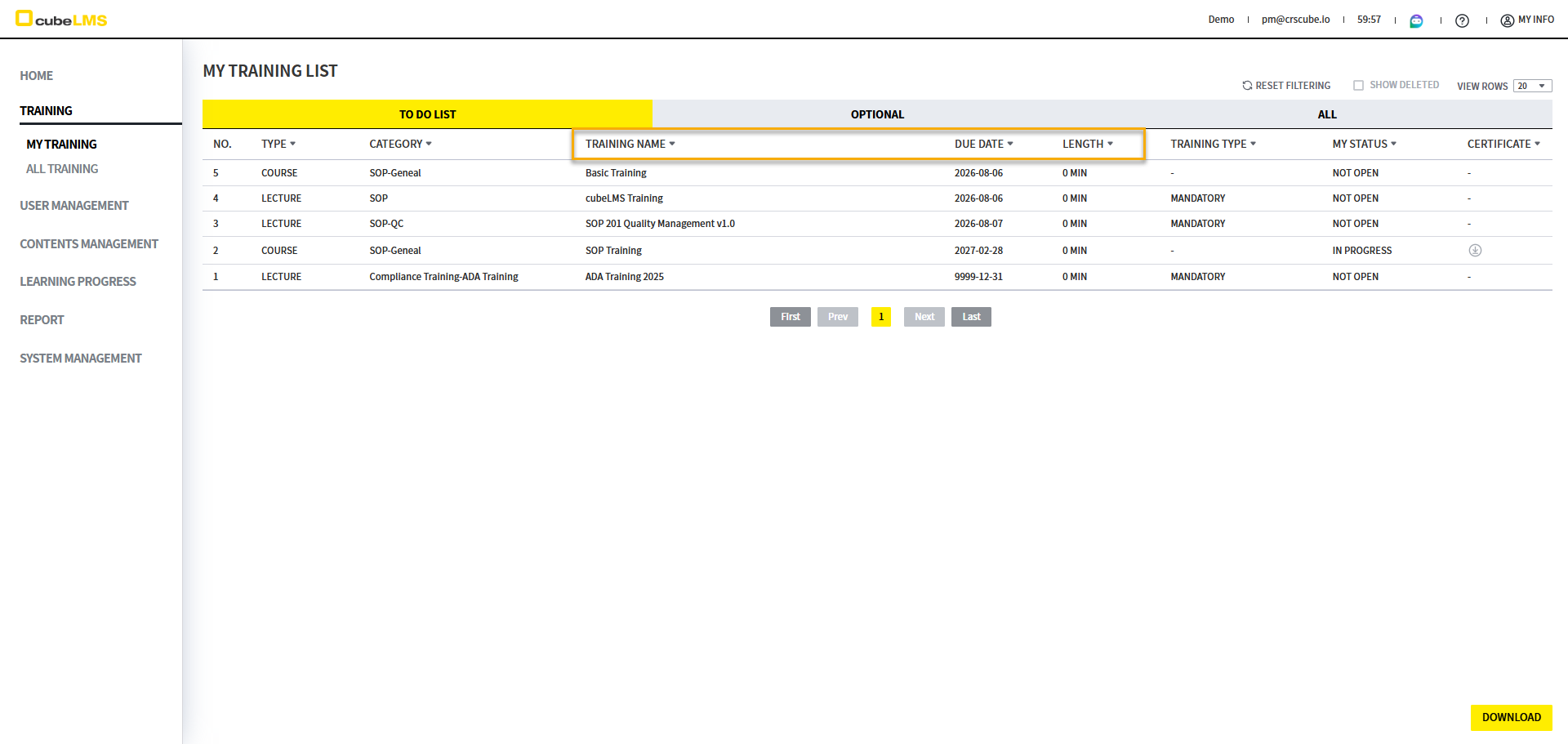
To Do List

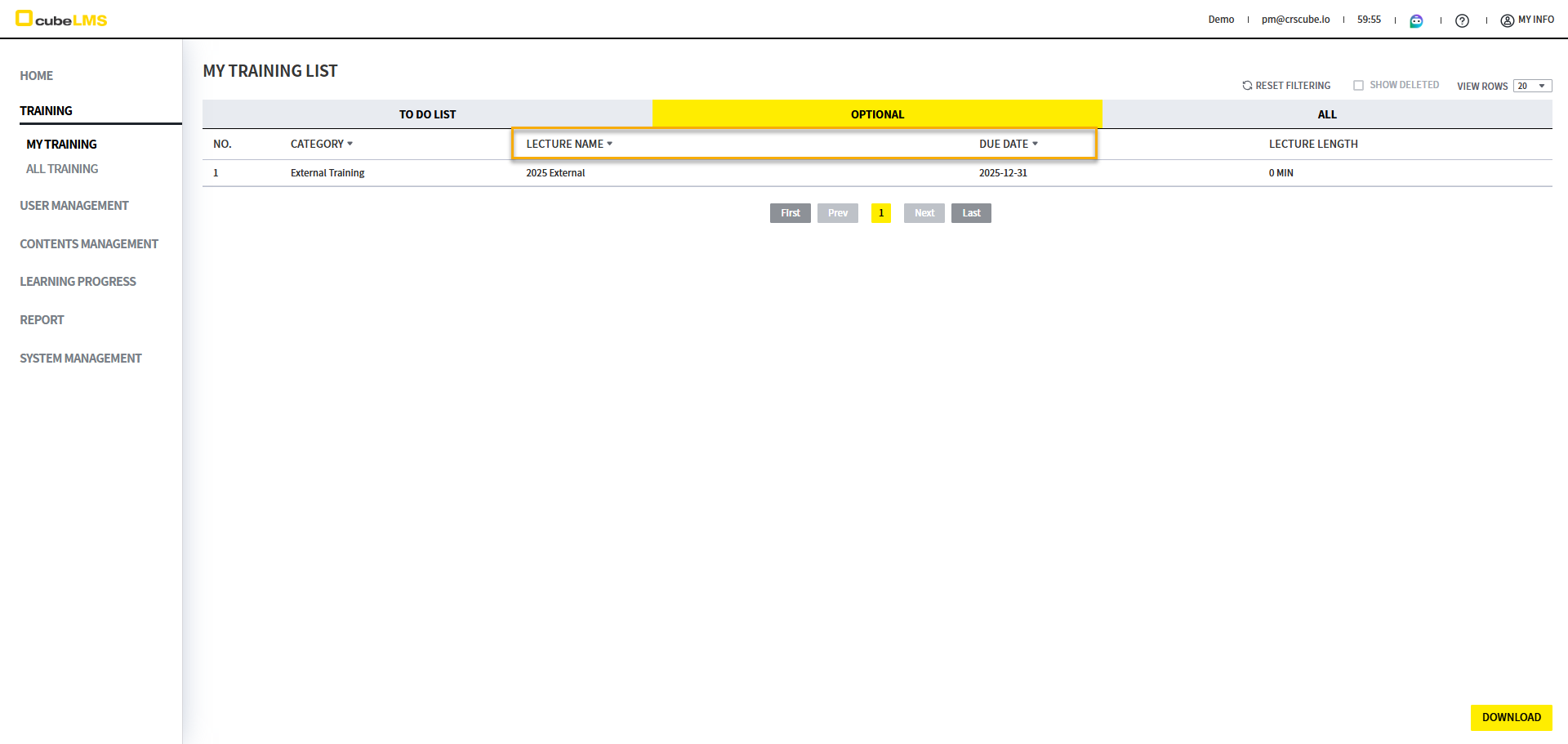
Optional

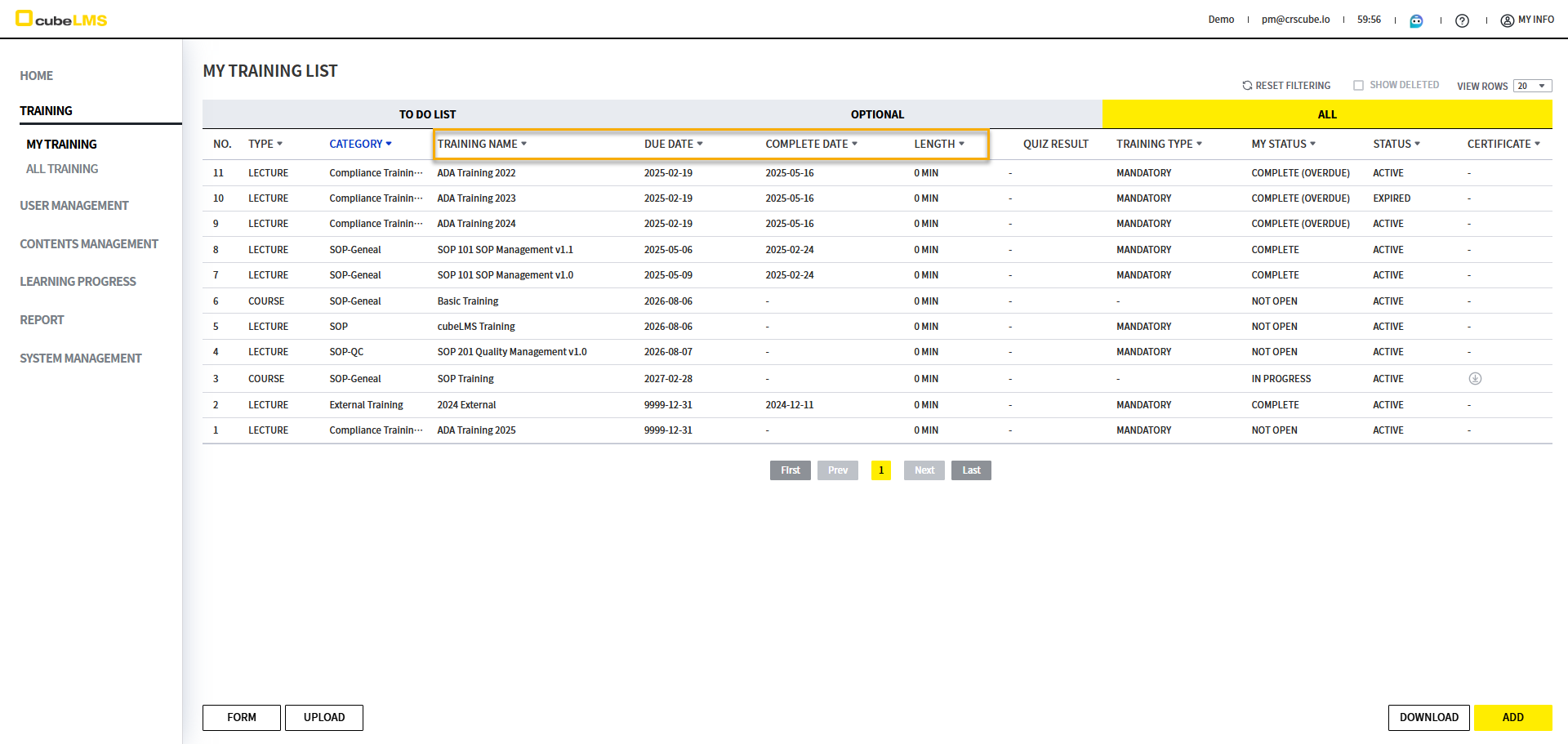
All

image-20250516-075446.png


image-20250516-072816.png


image-20250516-072848.png


Tab

Column

Filtering

Description

To Do List

Training Name

Text Input

この項目に含まれるテキストを基準にフィルタリングできます。

Due Date

Date Range

Trainingの締切日範囲を基準にフィルタリングできます。

Length

Number Range

Trainingの長さをフィルタリングできます。

Optional

Training Name

Text Input

この項目に含まれるテキストを基準にフィルタリングできます。

Due Date

Date Range

Trainingの締切日範囲を基準にフィルタリングできます。

All

Training Name

Text Input

この項目に含まれるテキストを基準にフィルタリングできます。

Due Date

Date Range

Trainingの締切日範囲を基準にフィルタリングできます。

Complete Date

Date Range

Trainingの完了日範囲を基準にフィルタリングできます。

Length

Number Range

Trainingの長さをフィルタリングできます。


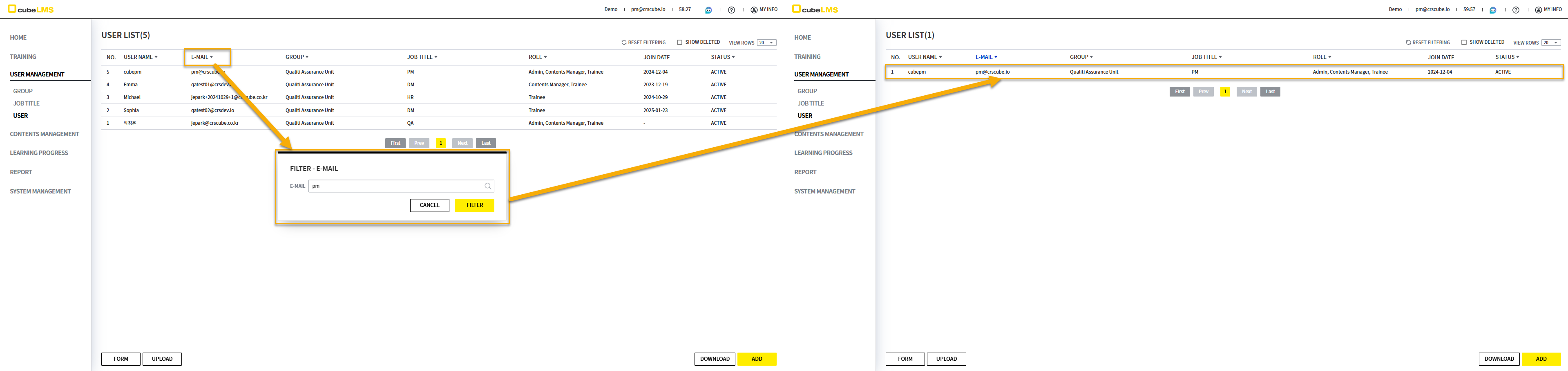
User Management - User
image-20250516-073141.png

Column

Filtering

Description

Training Name

Text Input

本項目を Like で Filtering できます。


Number Rage Filter

cubeLMSに初めて追加されたフィルターです。詳細内容は以下のとおりです。
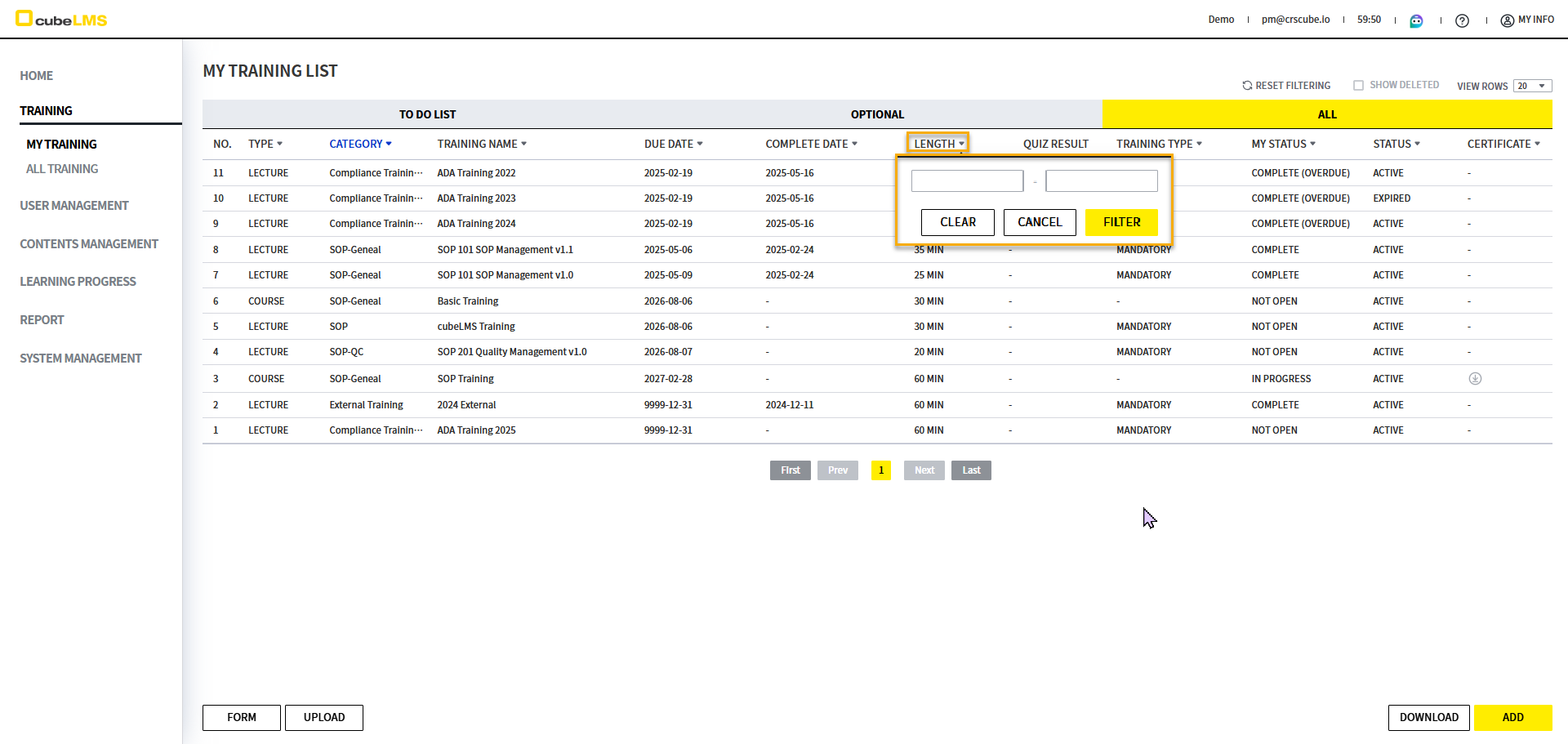
image-20250516-074915.png


  • 数字のみ入力できます。

image-20250516-075012.png


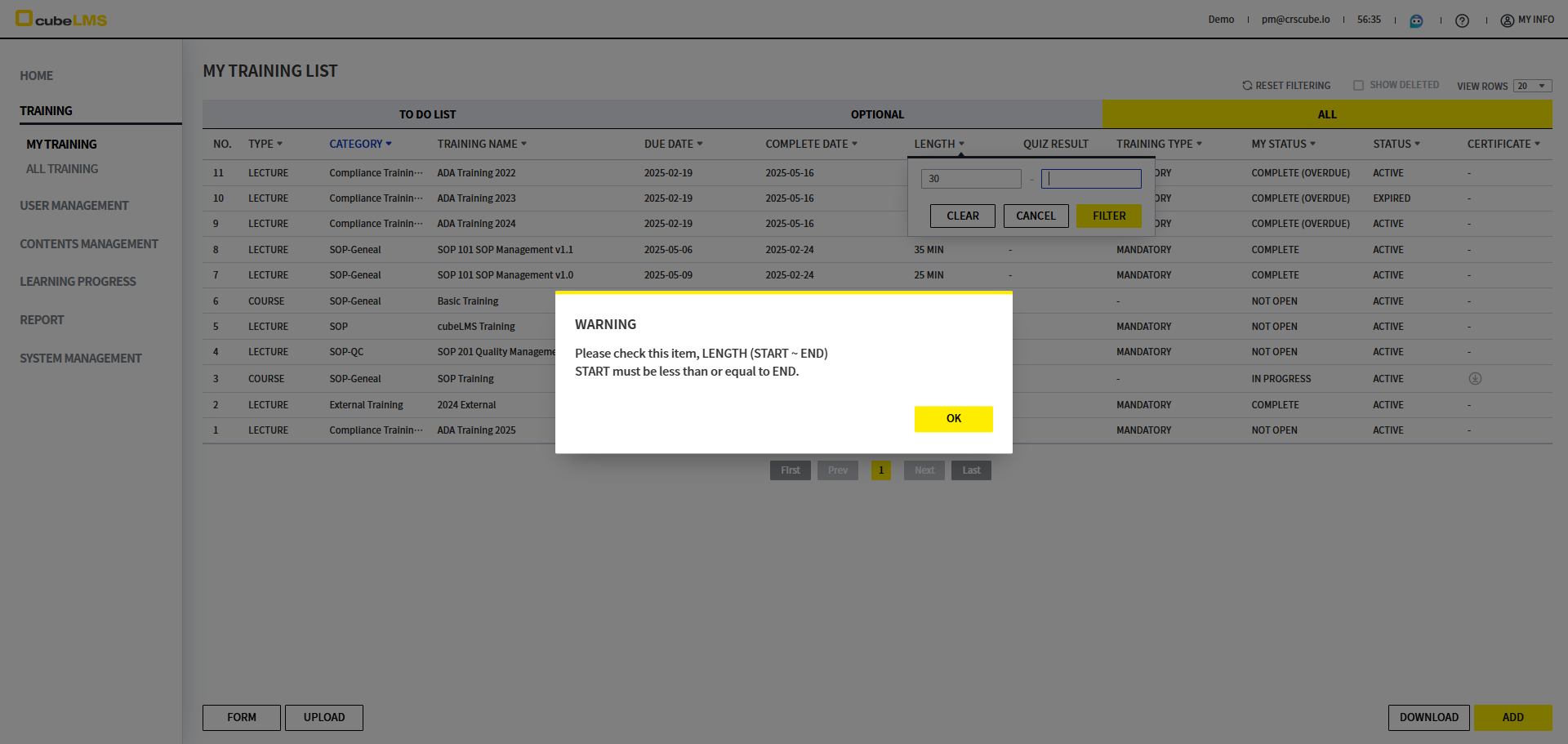
  • 開始値を終了値より大きく入力したり、終了値を開始値より小さく入力してフィルターした場合、次のポップアップが表示されます。

    • WARNING

    • Please check this item, LENGTH (START ~ END). START must be less than or equal to END.


[Learning Progress] User メニューの Active Period ラベル変更

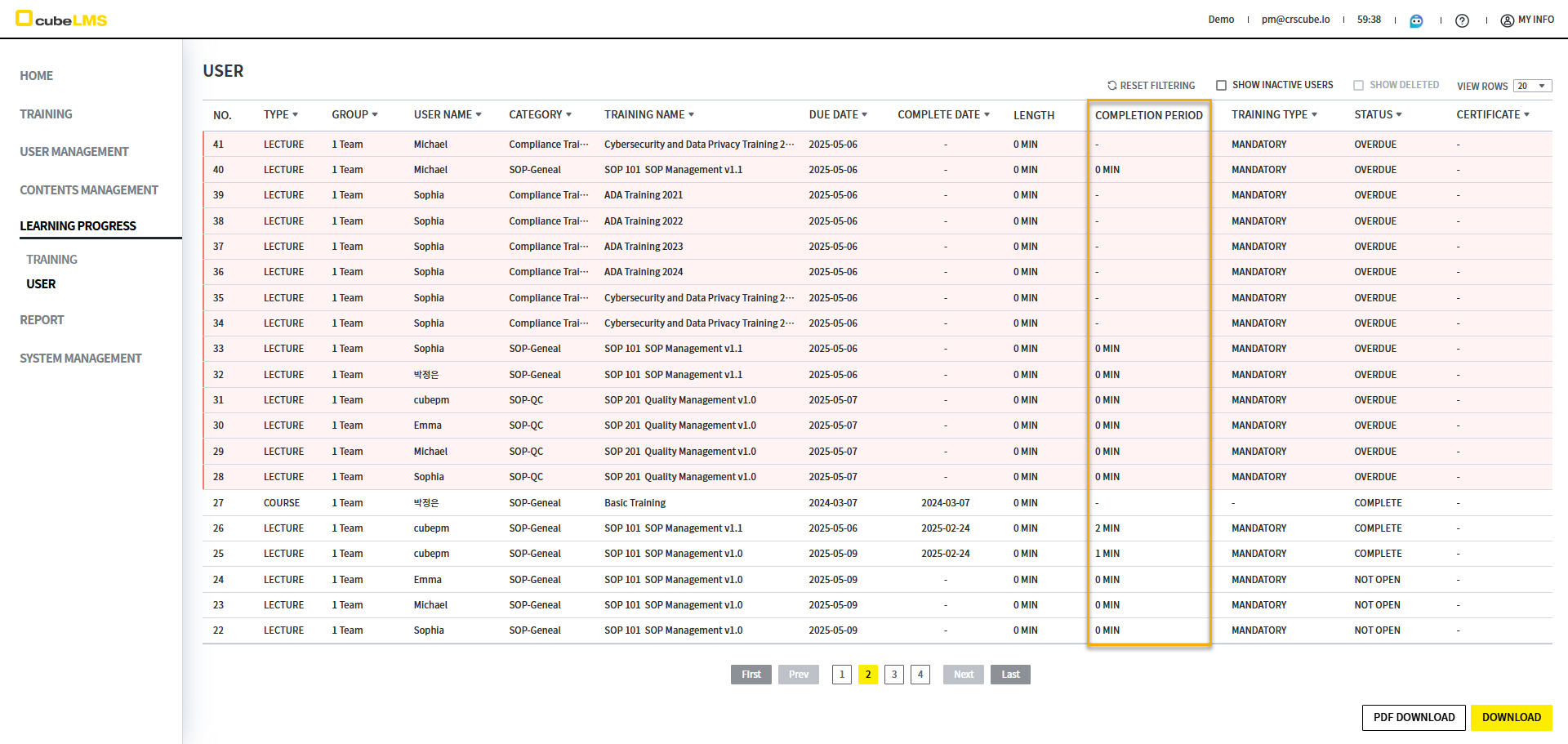
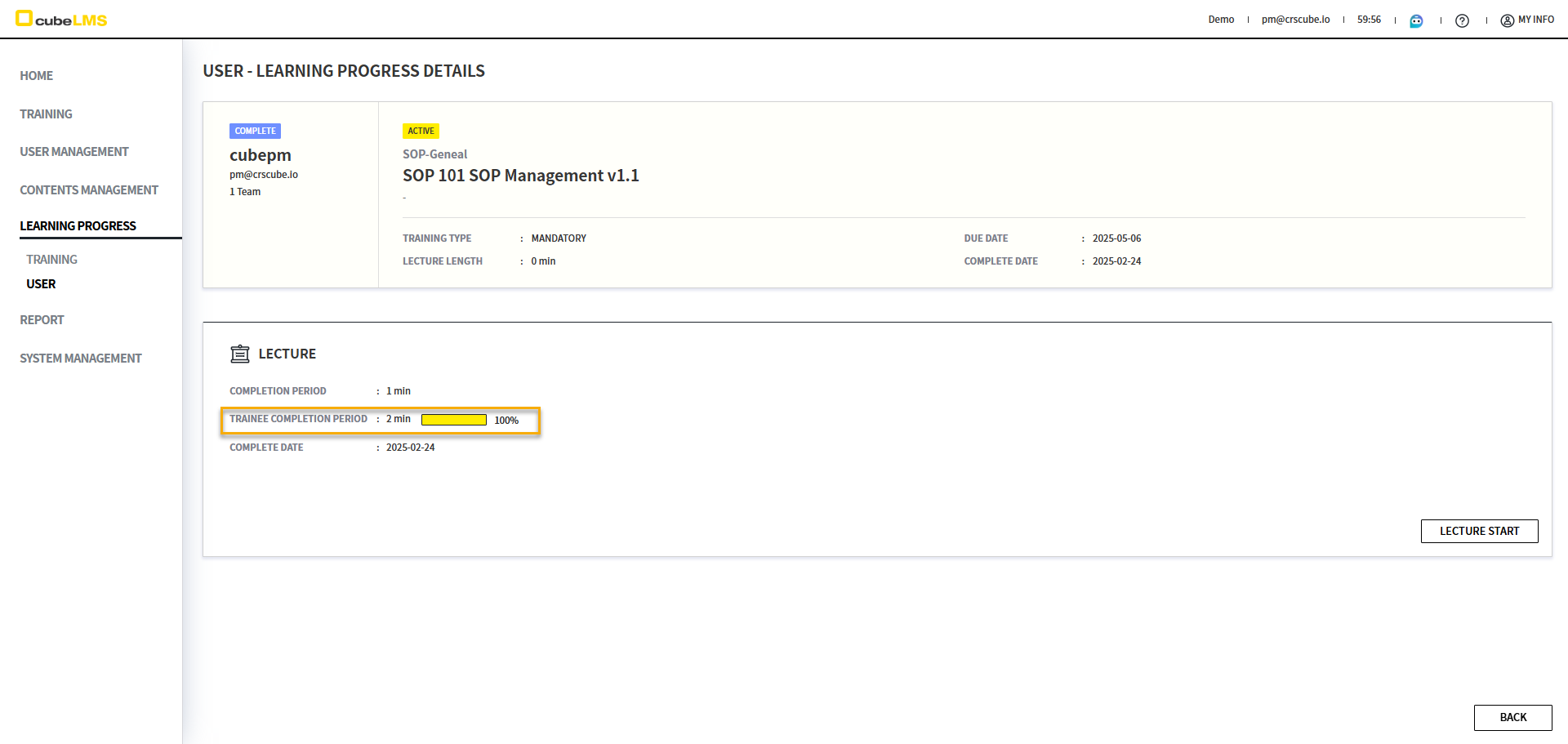
  • Learning Progress - Userメニューの一覧に表示される特定の列の文言がUserに混乱を招くおそれがあるため、詳細画面と同じ内容に変更されました。

    • 変更前: Active Period

    • 変更後: Completion Period

image-20250509-023449.png
image-20250509-023458.png


[Dashboard] Role別に表示される Summary Information の改善

Role

Category

AS-IS

TO-BE

Admin

文言変更

image-20241205-060517.png
  1. TRAINEE - OVERDUE
    The number of trainees that exceed due date of assigned Lecture.

  2. TRAINEE - COMPLETE(OVERDUE)
    The number of trainees who have been completed the assigned Lecture beyond the due date.

  3. Lecture PROGRESS
    The number of Lectures not completed.

  4. INVALID LectureS
    The number of Lectures in invalid status.

  1. Training - OVERDUE
    The number of assigned Training exceeded the due date.

  2. Training - COMPLETE(OVERDUE)
    The number of assigned Training completed after the due date.

  3. INCOMPLETE PROGRESS
    The number of "INCOMPLETE" Training at least one trainee has not completed.

  4. INVALID LectureS
    The number of "INVALID" Lectures.

Contents Manager

文言変更

image-20241205-063636.png
  1. INVALID
    The number of Lectures in invalid status.

  2. ACTIVE
    The number of Lectures in "ACTIVE" status.

  3. INACTIVE
    The number of Lectures in "INACTIVE" status.

  4. TOTAL
    The number of total Lectures registered.

  1. NVALID
    The number of "INVALID" Lectures.

  2. ACTIVE
    The number of "ACTIVE" Lectures.

  3. INACTIVE
    The number of "INACTIVE" Lectures.

  4. TOTAL
    The number of total Lectures registered.

集計変更

  • Active: Active状態のLecture、Courseの数

  • Total: Lecture、Courseの合計

  • Active: Active状態のLecture数

  • Total: 全体のLecture数

Trainee

文言変更

image-20241205-063704.png
  1. OVERDUE
    The number of Lectures in "OVERDUE" status.

  2. NOT OPEN
    The number of Lectures in "NOT OPEN" status.

  3. IN PROGRESS
    The number of Lectures in "IN PROGRESS" status.

  4. COMPLETE
    The number of Lectures in "COMPLETE" AND "COMPLETE(OVERDUE) status".

  1. OVERDUE
    The number of "OVERDUE" vTraining.

  2. NOT OPEN
    The number of "NOT OPEN" Training.

  3. IN PROGRESS
    The number of "IN PROGRESS" Training.

  4. COMPLETE
    The number of "COMPLETE" or "COMPLETE(OVERDUE)" Training.

フィルタリング変更

  • COMPLETE カード選択: 以下の条件でFilterされた画面へ移動します

    • Status: Complete, Complete(Overdue)

  • COMPLETE カード選択: 以下の条件でFilterされた画面へ移動します

    • Status: Complete, Complete(Overdue)

    • Category: 前回のトレーニングを除いたカテゴリ


[Group] Filter ポップアップで Group が個別にチェックされるように改善

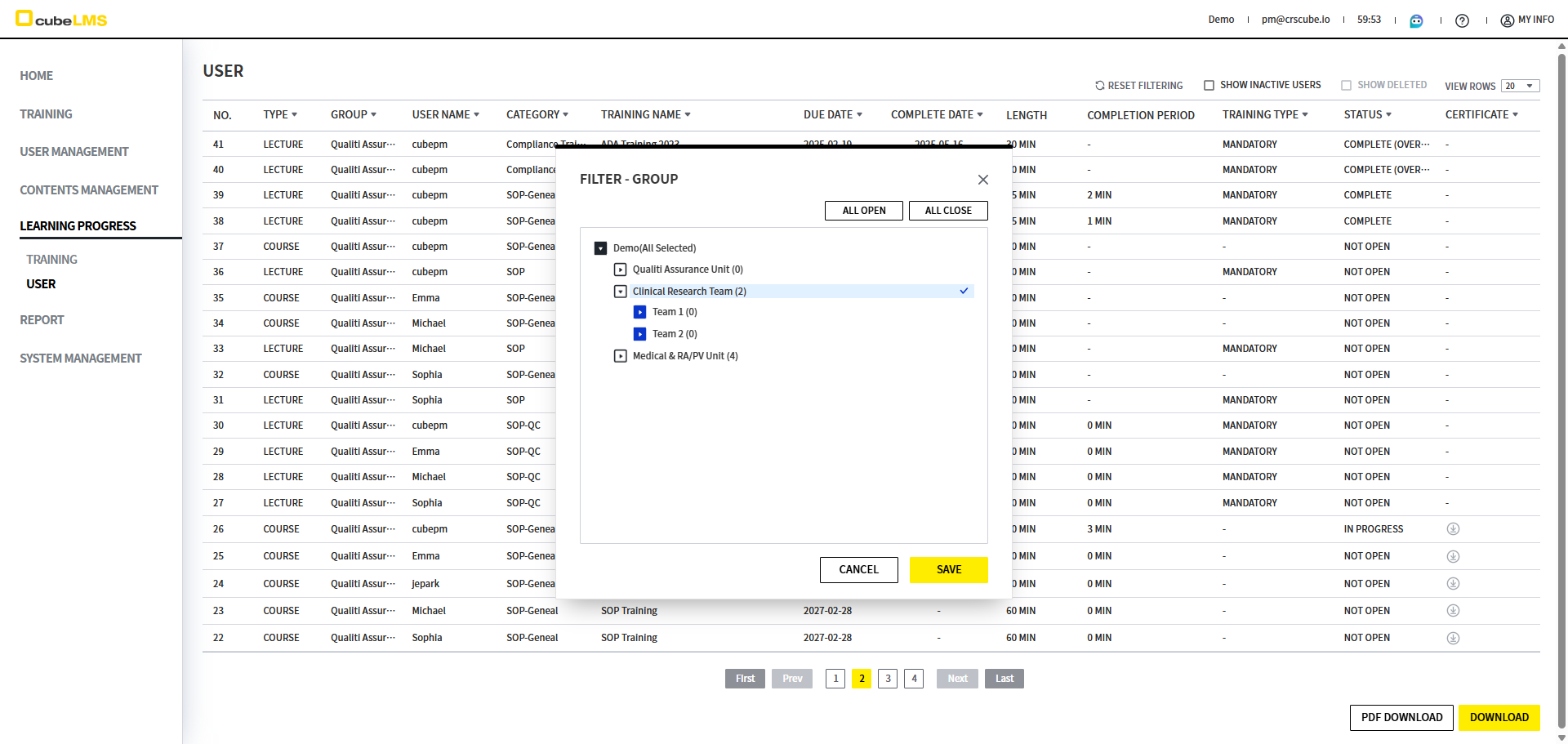
カテゴリーと同様に、階層構造のグループフィルターポップアップで各グループを個別に選択できるように改善されました。

  • 変更前: 親グループを選択すると子グループがすべて選択されます。

  • 変更後: 選択したグループのみ選択されます。

image-20250519-050832.png


その他

Release Date: 2025年6月22日

  • LectureとCourseが含まれるCategoryを削除する際に表示される文言が変更されました。

    • 変更前: Can not delete the category. There are not deleted Lectures in the category.

    • 変更後: Cannot delete the category. This category contains Training.

  • Learning Progress - UserメニューのLecture Detail画面でQuiz HistoryをDownloadした場合、Learning_Progress_User_Quiz_History_List_yyyymmddhhmmss形式で表示されるように変更されました。

  • FilterポップアップでLike検索後に全選択した場合、Like検索された内容のみがチェックされるように変更されました。