COURSE DETAILS
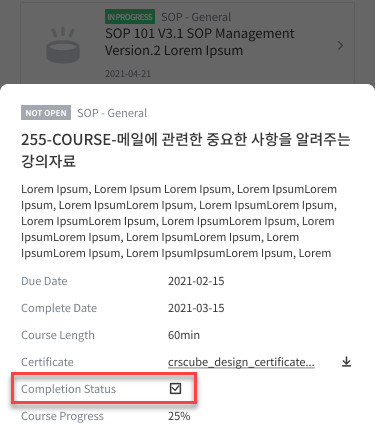
When you click a COURSE row, the detail screen appearsCOURSE details and the course status and completion date are displayed.
-
Click a specific LECTURE row in INCLUDED LECTURE to go to the corresponding LECTURE DETAILS page.
-
LECTURE 행 좌측에 표시된 아이콘은 MY TRAINING · TO DO 페이지에 아이콘 설명과 동일합니다.
-
-
An OVERDUE LECTURE is highlighted in red, listed at the top, and sorted by DUE DATE.
CERTIFICATE
-
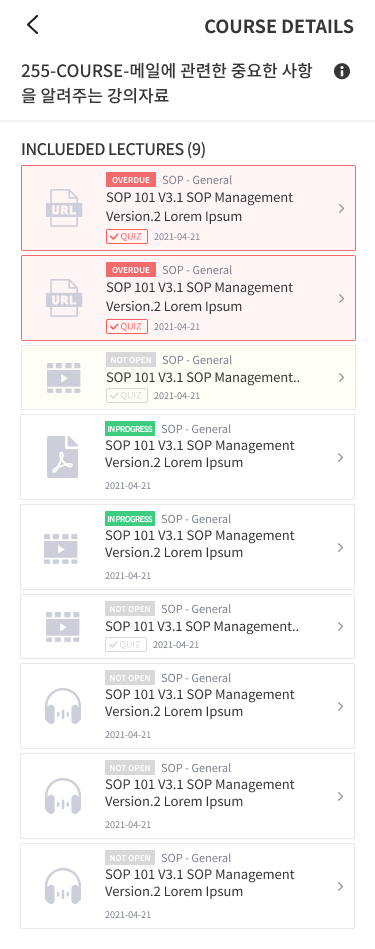
After completing the COURSE, you can check the Certificate through COURSE Information.
-
Click the CERTIFICATE download button to download the certificate. If there is no CERTIFICATE, the button is not displayed.
Download 는 Android만 지원하며 iOS는 지원하지 않습니다.
COMPLETION STATUS
-
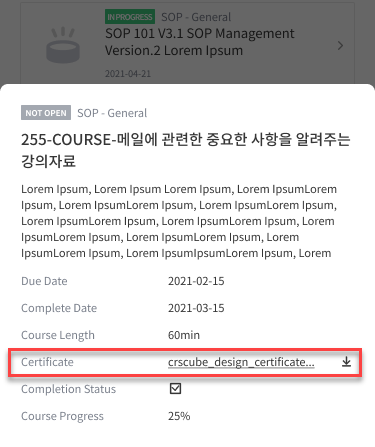
The Completion Status item is displayed in Information for COURSE with CONTENT MANAGER CHECK.
-
Even if the TRAINEE completes all LECTUREs in the COURSE, the COURSE is not completed, and the CONTENT MANAGER can check it to change it to the final completed status.